


1Password for Business: What It Costs
Posted by Saif Khan on 2026 Sep 24th
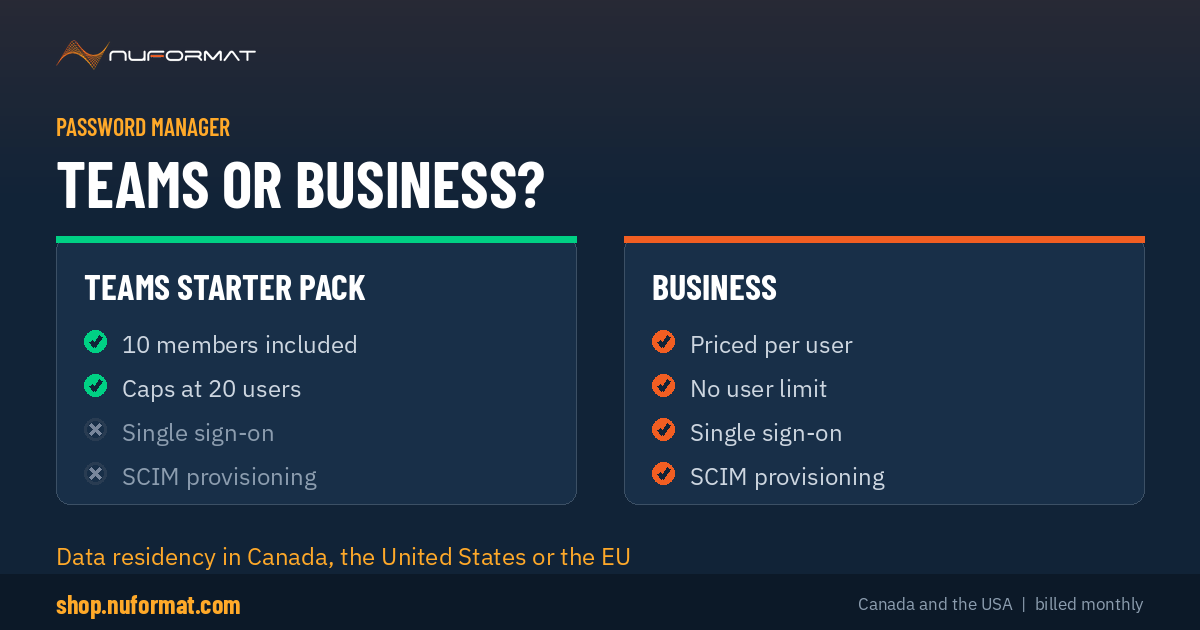
In short: 1Password sells two business plans. Teams Starter Pack includes 10 members, caps at 20 users, and has no single sign-on or SCIM. Business is priced per user with SSO, SCIM, SIEM streaming and no ceiling. Both can store encrypted data in Canada, the United States or the European Union. Nuformat sells both on monthly billing across Canada and the USA.
The password manager is the one application that holds the keys to everything else, which makes choosing it a slightly different exercise from choosing other software. This covers what each 1Password plan includes, what it costs, and the regional question most Canadian buyers ask first.
What does 1Password actually do?
It stores credentials in encrypted vaults and fills them where they are needed. Shared vaults hold what a team needs in common, scoped by group, so finance sees finance and marketing sees marketing. Each person also gets a private vault that administrators cannot read, which matters more for adoption than any feature on the list. People will not put their own logins somewhere their employer can see.
Beyond passwords it holds SSH keys, API tokens, payment details and documents, and it supports passkeys for accounts that have moved past passwords entirely.
How does the encryption work?
Two things are needed to decrypt your data: your account password, and a 128-bit Secret Key generated on your device and stored there. Both are required. Someone who phishes the password has nothing useful without the key.
Data is encrypted with AES 256-bit, in transit as well as at rest, using the Secure Remote Password protocol. 1Password cannot decrypt your vaults, which is the practical meaning of zero-knowledge. It also means account recovery works differently from most services, which is worth understanding before rollout rather than during an incident.
1Password holds SOC 2 Type II certification and publishes independent third-party audits.
What is Watchtower?
An audit that runs across every credential in the organization and flags weak passwords, reused passwords, logins missing two-factor authentication, and any credential that has appeared in a known breach. Administrators see it across the whole tenant rather than one account at a time.
In practice this is the feature that justifies the rollout internally. Most organizations do not know how many of their credentials are reused until something produces the list.
Teams or Business, and what each costs
1Password publishes these rates on annual billing:
| Teams Starter Pack | Business | |
| Published price | 24.95 USD or 29.95 CAD per month | 8.99 USD per user per month |
| Users included | 10 members | Priced per user |
| Maximum users | 20, adding seats at 4.99 USD or 6.25 CAD each | No limit |
| Single sign-on | No | Yes |
| SCIM provisioning | No | Yes |
| Event streaming to SIEM | No | Yes |
| Custom business reports | No | Yes |
| Guest accounts | 5 | 20 |
| Developer tools and CLI | Yes | Yes |
| Free Families plan per user | Yes | Yes |
Those are 1Password's annual rates. Nuformat sells both on monthly billing with no annual commitment, which costs a little more per month and lets you stop or change plan whenever you want. For a growing team that flexibility is usually worth more than the annual discount.
Do we need single sign-on and SCIM?
This is the question that decides which plan you buy, so it is worth answering honestly rather than upward.
Under about 20 people, you need neither. You add someone a few times a year and it takes five minutes. Paying per user for integrations you will not configure is money spent for nothing.
Past 30 or so, SCIM is the reason to move. Not convenience. Offboarding. When someone leaves, removing them from your identity provider revokes their 1Password access automatically. Done by hand, that step gets missed, and a former employee retaining access to the vault holding every other credential is the worst version of this going wrong.
Single sign-on is the lesser of the two. It saves a password, and it puts your existing MFA and conditional access rules in front of 1Password rather than configuring them separately. Useful if you run Microsoft Entra ID or Okta properly. Not a reason on its own to change plan.
There is also a hard ceiling: Teams stops at 20 users. If you expect to pass that within the year, start on Business rather than migrating later.
Where is the data stored, and does Canada matter?
1Password offers data residency in Canada, the United States and the European Union. You choose the region when the account is created.
For Canadian organizations with residency obligations, whether contractual, provincial or sector-specific, this is the difference between 1Password being viable and not. Public sector, healthcare and anyone handling personal information under provincial privacy law tends to ask about it first.
The practical point: choose at setup. Moving an existing tenant between regions is considerably harder than picking the right one on day one, and it is the kind of thing nobody thinks about until a procurement questionnaire asks.
Worth knowing too that 1Password is a Canadian company, headquartered in Toronto. That is not a technical control, but it does come up in procurement conversations.
Is it available in both Canada and the United States?
Yes. Nuformat supplies and supports both plans across Canada and the United States, billed monthly in your currency, on the same invoice as the rest of your security stack.
Frequently asked questions
How much does 1Password cost for a business?
1Password publishes two business plans. The Teams Starter Pack is 24.95 USD or 29.95 CAD per month on annual billing and includes 10 members. Business is 8.99 USD per user per month on annual billing. Nuformat sells both on monthly billing with no annual commitment, which costs slightly more per month and lets you stop whenever you want.
What is the difference between 1Password Teams and 1Password Business?
Business adds single sign-on, SCIM provisioning, event streaming to SIEM tools, custom groups and custom business reports, and has no user limit. The Teams Starter Pack includes 10 members, allows up to 10 additional seats for a maximum of 20 users, and has neither SSO nor SCIM.
How many users can the 1Password Teams Starter Pack have?
Twenty. Ten members are included in the pack and you can add up to ten more at per-seat pricing, which 1Password lists at 4.99 USD or 6.25 CAD per seat per month on annual billing. Past twenty users you need the Business plan.
Can 1Password store our data in Canada?
Yes. 1Password offers data residency in Canada, the United States and the European Union, and you choose the region when the account is created. Canadian organizations with residency obligations can keep encrypted data in Canada. Moving an existing account between regions is harder than choosing correctly at setup.
Is 1Password available in Canada and the United States?
Yes, in both. 1Password is a Canadian company headquartered in Toronto, and Nuformat supplies and supports both business plans across Canada and the United States.
What is the 1Password Secret Key?
A 128-bit key generated on your device and stored there, used alongside your account password to decrypt your data. Both are required, so a stolen or phished account password on its own does not open a vault. 1Password cannot decrypt your data either, which is what zero-knowledge means in practice.
Do we need SCIM provisioning?
If you have more than about 30 people, probably yes. SCIM revokes a departing employee's 1Password access automatically when they are removed from your identity provider. Done by hand that step is often missed, and the password manager holds the credentials to everything else. Below about 20 people, handling it manually is manageable.
Does 1Password work with Microsoft Entra ID?
Yes, on the Business plan. Single sign-on and SCIM provisioning work with Microsoft Entra ID, Okta, Google Workspace, OneLogin, Rippling and JumpCloud. The Teams Starter Pack does not include either.
Get it quoted
Tell us your headcount and whether you need Canadian data residency. We will confirm which plan fits, quote it monthly, set up the tenant and connect it to your identity provider where that applies. If the smaller plan is the right answer we will say so.
Request a quotePlan features, user limits, guest account counts and published pricing as listed by 1Password. Nuformat monthly pricing confirmed at the time of order.